


Whether they’re answered by AI agents or human participants, forecasting questions often require more structure than other types of survey questions. For example, when asking about inflation or interest rates, you might want a range forecast (e.g., “between 2% and 4%”) rather than just a single number. You may also want to capture the reasoning behind a forecast, allowing respondents to answer in their own words while still recording the details in a format that can be analyzed consistently.
With EDSL, you can design forecasting questions in whatever form makes sense — from open-ended free text to tightly specified schemas — and have the responses automatically returned as a well-structured dataset. This makes it easy to experiment with different ways of framing questions for both AI agents and humans while ensuring that outputs remain standardized, comparable, and ready for analysis.
In this post, we’ll walk through a simple example using EDSL to design a forecasting question, administer it in multiple formats to an agent persona powered by an LLM, and inspect the results. We’ll also show how unstructured free-text answers can be transformed into structured data automatically. For more details on the methods used, see our documentation page.
EDSL is an open-source package for simulating surveys with AI agents and LLMs of your choice. It is maintained by Expected Parrot and available under the MIT License. Please join our Discord to ask questions, submit feature requests, and connect with other researchers!
1. Defining Forecasting Questions
Let’s start with a forecasting question about U.S. CPI inflation in December 2025. We’ll frame it two ways, using different EDSL question types that allow us to specify the format of the model’s response:
Structured (dictionary format): where we prompt a model to provide a lower bound, an upper bound, and rationale.
Free text: where a model can respond however it chooses.
We combine the questions in a survey to administer them together. Note that by default questions are administered async, so we can get choose whether to generate independent answers or (optionally) add within-survey memory (here we do not):
from edsl import QuestionDict, QuestionFreeText, Survey

question_text = """What will the year-over-year U.S. Consumer Price Index (CPI) inflation rate be in December 2025? Provide your forecast as a range (e.g., 2.0%-4.0%). The range should reflect the interval you believe has a 90% chance of containing the true outcome, based on BLS published data."""

q1 = QuestionDict(
    question_name = "q1",
    question_text = question_text,
    answer_keys = ["range_lower_bound", "range_upper_bound", "rationale"],
    value_types = [float, float, str],
    value_descriptions = [
        "The lower bound value of your forecasted range.",
        "The upper bound value of your forecasted range.",
        "The rationale for your forecast."
    ]
)

q2 = QuestionFreeText(
    question_name = "q2",
    question_text = question_text
)

survey = Survey(questions = [q1, q2])
2. Creating an Agent and Running the Survey
We’ll give our agent a (very) simple persona — a “professional forecaster” — and then select a model to generate the answers. EDSL works with models from many popular service providers; you can check available models, token prices and performance here. To administer the survey we simply add the agent and model, and then run the job:
from edsl import Agent, Model

agent = Agent(traits = {"persona":"professional forecaster"})

model = Model("gemini-2.5-flash", service_name = "google")

results = survey.by(agent).by(model).run()
3. Inspecting Results
The results are a formatted dataset that includes columns of information about the questions, agent, model, tokens, raw responses and other details of the job. We can inspect them at Expected Parrot or in a notebook. Here we print just the answers in a table:
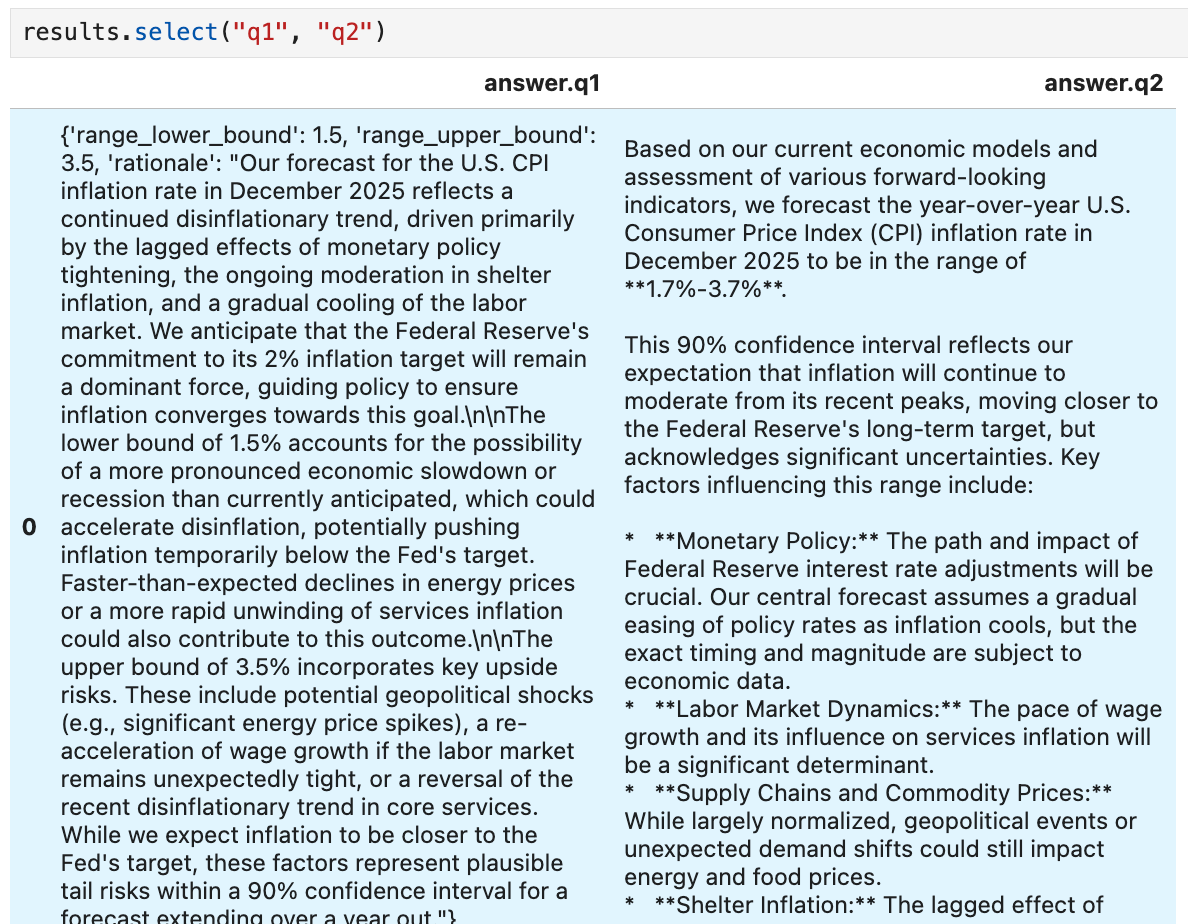
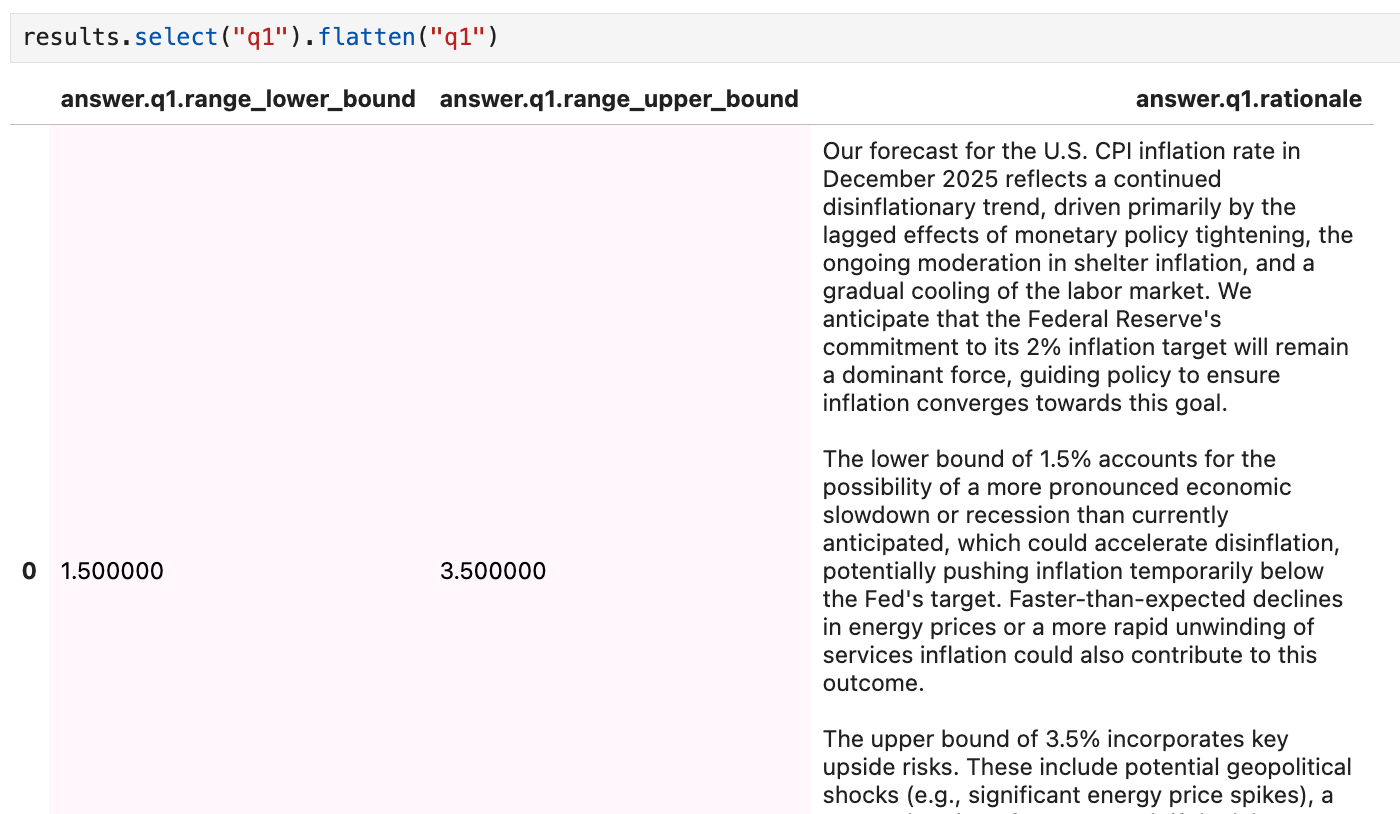
We can flatten a dictionary answer for easier analysis (see methods for working with results SQL, pandas, or other tools):
3. Turning unstructured text into structured data
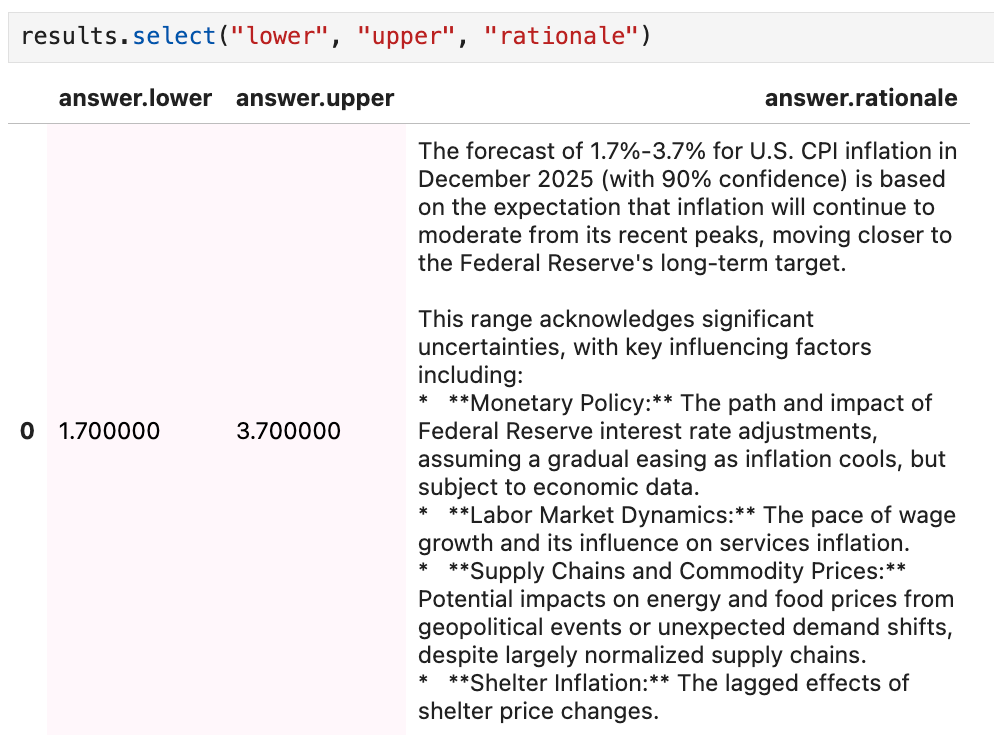
We can also use other EDSL question types to reformat the free text response. Here we create a "scenario" for the text in order to add it to questions prompting a model to extract the range values (as floats) and summarize the rationale in the original answer:
from edsl import Scenario, QuestionNumerical, QuestionFreeText, Survey

# use the q2 answer as a Scenario in new questions
unstructured_answer = results.select("q2").to_list()[0]

s = Scenario({"unstructured_answer":unstructured_answer})

q1 = QuestionNumerical(
    question_name = "lower",
    question_text = "Identify the LOWER bound value in the following response: {{ scenario.unstructured_answer }}"
)

q2 = QuestionNumerical(
    question_name = "upper",
    question_text = "Identify the UPPER bound value in the following response: {{ scenario.unstructured_answer }}"
)

q3 = QuestionFreeText(
    question_name = "rationale",
    question_text = "Summarize the rationale provided in the following response: {{ scenario.unstructured_answer }}"
)

survey = Survey(questions = [q1, q2, q3])

results = survey.by(s).by(model).run() # no agent used
4. Why This Matters
Forecasting often benefits from a mix of formats:
Structured formats make it easy to aggregate, compare, and analyze forecasts.
Free text formats capture richer reasoning and context.
By combining both in the same survey, you can explore how LLMs and human respondents differ in not just what they forecast, but how they explain their forecasts.
Try It Yourself
You can reproduce this workflow by installing EDSL:
!uv pip install edsl -q
Log in to Expected Parrot (your account comes with free credits for API calls to LLMs for getting started):
from edsl import login
login()
Download the complete notebook for the code examples above here.